
By Saad Iqbal
Twenty minutes before the first stage, the frac supervisor is staring at a job design that calls for 8,500 psi treating pressure at 80 bbl/min, and seven pumps parked on location. The question that decides whether this stage pumps clean or trips the fleet offline mid-stage is simple to ask and easy to get wrong: is seven pumps enough? Getting hydraulic horsepower sizing right — not the nameplate horsepower bolted to the side of the pump, but the actual hydraulic horsepower the fluid needs and the derated horsepower the fleet can deliver all day — is what separates a job that finishes on schedule from one that stalls out two pumps short. This tutorial walks through exactly how to calculate hydraulic horsepower and size a pump fleet for a frac job, by hand and in Python.
What you need before you size a frac pump fleet
PREREQUISITES — have these on hand before you start:
- Target treating (surface) pressure for the stage, in psi
- Target pump rate, in bbl/min or gpm
- Nameplate horsepower rating for each pump unit on the fleet
- The pump manufacturer’s continuous-duty derating factor (commonly 70-85% of nameplate for sustained frac pumping)
- Mechanical/hydraulic efficiency for the pump type (triplex pumps typically run 80-90%)
- Your required safety margin or standby-pump policy
- A Python environment, or a spreadsheet, to run the calculation
With those seven inputs in hand, sizing the fleet is six steps.
Step 1 — Nail down target pressure and rate
What to do: Pull the treating pressure and pump rate straight from the stage’s pump schedule — not the average for the job, the peak sustained values, since that’s what the fleet has to be sized against.
Why it matters: Every horsepower number downstream scales directly off these two inputs. Sizing against an average rate instead of the peak is the single most common reason a “properly sized” fleet comes up short mid-stage when the engineer ramps to max rate.
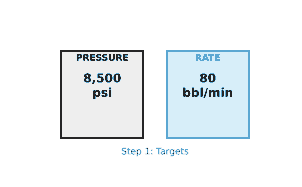
Worked example: Target treating pressure = 8,500 psi. Target rate = 80 bbl/min, which converts to 80 × 42 = 3,360 gpm (42 gallons per barrel).
Step 2 — Calculate hydraulic horsepower
What to do: Apply the standard oilfield hydraulic horsepower formula:
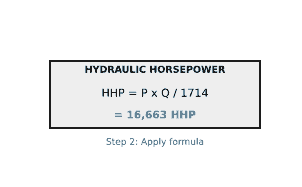
HHP = (P × Q) / 1714, with P in psi and Q in gpm
Why it matters: This is the actual hydraulic work the fluid needs done to it — the number every other step in this tutorial exists to deliver. The constant 1714 converts psi × gpm into horsepower and comes from the mechanical-to-hydraulic unit conversion (33,000 ft-lbf/min per HP and 231 in³ per gallon).
Worked example: HHP = (8,500 × 3,360) / 1714 = 28,560,000 / 1714 ≈ 16,664 HHP.
Step 3 — Convert to required input (brake) horsepower
What to do: Hydraulic horsepower is what the fluid receives; the pumps have to put in more than that to cover mechanical losses. Divide by the pump’s mechanical efficiency:
Input HP = HHP / efficiency
Why it matters: Skipping this step is the fastest way to undersize a fleet. A triplex pump doesn’t convert input power to hydraulic power at 100% — valve, packing, and gearbox losses mean 10-20% of the input horsepower never reaches the fluid at all, and the fleet has to be big enough to supply the input number, not the hydraulic one.
Worked example: At 85% mechanical efficiency: Input HP = 16,664 / 0.85 ≈ 19,604 HP.

Step 4 — Size the pump fleet with continuous-duty derating
What to do: A pump’s nameplate horsepower is a short-term rating. For sustained frac pumping, apply the manufacturer’s continuous-duty derating factor before dividing up the required input horsepower:
Usable HP per pump = Nameplate HP × duty factorPumps required = ⌈ Input HP / Usable HP per pump ⌉
Why it matters: This is where “the nameplate math worked” jobs still come up short on location. Running a 3,000 HP pump at its full nameplate rating for a multi-hour stage accelerates plunger, packing, and valve wear and risks a mid-stage trip — the duty factor exists precisely so the fleet doesn’t live on the ragged edge for the whole stage.
Worked example: With 3,000 HP pumps at 80% continuous duty: usable HP per pump = 3,000 × 0.80 = 2,400 HP.
Pumps required = ⌈19,604 / 2,400⌉ = 9 pumps, delivering 9 × 2,400 = 21,600 HHP online — roughly a 10% margin over the 19,604 HP actually required.

Step 5 — Check sensitivity to pressure and rate
What to do: Re-run Steps 2-4 across the full range of pressure your design might see — not just the planned pressure, but what happens if near-wellbore friction or a tighter-than-modeled perforation design (check our perforation friction pressure calculation for that input) pushes treating pressure higher than planned.
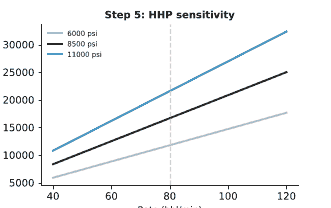
Why it matters: HHP scales linearly with both pressure and rate, so a fleet sized with zero margin at the design pressure can be short the moment pressure runs 15-20% high — which happens routinely once a screenout risk or an unexpected breakdown pressure shows up. For context on how breakdown and net pressure behave on the way into a stage, see our hydraulic fracturing breakdown pressure and net pressure walkthrough.
Worked example: Plotting required HHP against rate at 6,000, 8,500, and 11,000 psi shows how much horsepower headroom the 21,600 HHP fleet actually has at each pressure level — the chart below makes clear that the same 9-pump fleet that comfortably covers 8,500 psi runs out of margin fast if treating pressure climbs toward 11,000 psi at the same rate.
Step 6 — Know the pitfalls that undersize a fleet
What to do: Before you lock in the pump count, check for these four common sources of error:
- Sizing against nameplate horsepower instead of the continuous-duty derated rating
- Forgetting mechanical efficiency and sizing to hydraulic horsepower alone, which understates required input HP by 10-20%
- Sizing to average rather than peak treating pressure, missing the margin needed for breakdown or screenout pressure spikes
- No standby pump in the count, so a single mechanical trip mid-stage drops the fleet below required horsepower with no redundancy
Why it matters: Every one of these shortcuts looks fine on paper and shows up as a problem only once pumps are already running at rate — exactly when there’s no time left to add a unit.
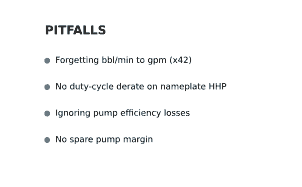
On location, these shortcuts rarely show up as a clean failure. They show up as a pump running hotter than the others, a plunger or packing job that comes due a month early, or a supervisor quietly throttling rate back below plan to keep the fleet inside its comfort zone — a soft, invisible cost that a few extra minutes of sizing math up front would have avoided entirely.
Automate it in Python
Here is the full Step 2-4 calculation as a reusable Python function, so you can size a fleet for every stage in a program without rebuilding the spreadsheet each time:
import math

def frac_fleet_size(pressure_psi, rate_bbl_min, efficiency,
                     pump_nameplate_hp, duty_factor):
    """
    Returns (HHP, input_hp, usable_hp_per_pump, pumps_required,
    hhp_online) for a frac pump fleet sizing check.

    pressure_psi      : treating (surface) pressure, psi
    rate_bbl_min       : pump rate, bbl/min
    efficiency          : pump mechanical/hydraulic efficiency (0-1)
    pump_nameplate_hp  : nameplate rating per pump unit, HP
    duty_factor         : continuous-duty derating factor (0-1)
    """
    rate_gpm = rate_bbl_min * 42.0                     # bbl/min -> gpm
    hhp = (pressure_psi * rate_gpm) / 1714.0            # hydraulic horsepower
    input_hp = hhp / efficiency                         # required input HP

    usable_hp_per_pump = pump_nameplate_hp * duty_factor
    pumps_required = math.ceil(input_hp / usable_hp_per_pump)
    hhp_online = pumps_required * usable_hp_per_pump

    return hhp, input_hp, usable_hp_per_pump, pumps_required, hhp_online


hhp, input_hp, usable, pumps, online = frac_fleet_size(
    pressure_psi=8500, rate_bbl_min=80, efficiency=0.85,
    pump_nameplate_hp=3000, duty_factor=0.80,
)

print(f"HHP required    = {hhp:,.0f} HHP")
print(f"Input HP needed = {input_hp:,.0f} HP")
print(f"Usable HP/pump  = {usable:,.0f} HP")
print(f"Pumps required  = {pumps}")
print(f"HHP online      = {online:,.0f} HHP")
Loop that function across the full pressure range for your design to reproduce the sensitivity chart in Step 5, or feed in each stage of a multi-stage pump schedule to get a pump count per stage instead of one number for the whole job. NumPy array operations make it easy to vectorize the pressure sweep instead of looping one value at a time.
What a good result looks like — and how to verify it
A trustworthy fleet sizing answer gives you a specific pump count with a known margin — not just “enough horsepower,” but how many pumps above the bare minimum you’re running, and at what pressure that margin disappears. Verify it two ways before the fleet locks in: first, sanity-check the HHP formula output against the manufacturer’s own pump curve for the planned rate and pressure — if your calculated HHP and their curve disagree by more than a few percent, double-check your rate unit conversion (bbl/min to gpm is the most common place this goes wrong); second, re-run Step 4 with one pump removed from the fleet to confirm the remaining pumps still clear required input horsepower — that’s your real answer to “what happens if one pump trips mid-stage.”
If you’re also watching treating pressure and rate live once pumps are on location, our roundup of the best AI tools for real-time frac monitoring and diagnostics covers the platforms that turn this same HHP math into a live, continuously updated number during the stage instead of a one-time pre-job calculation.
