

By Saad Iqbal
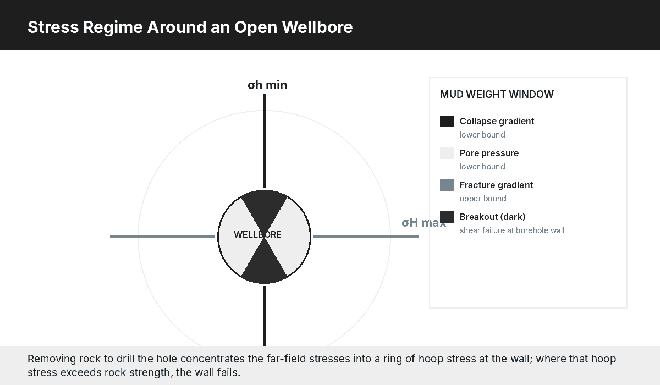
A wellbore doesn’t just sit in rock quietly waiting to be drilled through it. The instant the bit removes material, the stresses that rock was carrying have to go somewhere, and they concentrate into a ring around the open hole. Get the mud weight wrong by a few tenths of a pound per gallon in the wrong direction, and that concentrated stress either shears the wall inward as a breakout or blows it open as a fracture. Geomechanics software exists to tell you, before that happens, how much room you actually have.
We’ve looked at wellbore stability tools before on this site, covering JewelSuite, Petrel Geomechanics, and Elfen Wellbore. This time we’re going deeper on three different products that take a genuinely different approach to the same problem: a seismic-driven rock-physics tool, a log-driven wellsite tool, and an independent third-party alternative to the two oilfield-service giants.
The Physics Every One of These Tools Is Built On
Whatever the interface looks like, every geomechanics software package is running some version of the Mohr-Coulomb failure criterion to decide whether the rock around the wellbore is going to fail. In its simplest shear form:
τ = C₀ + σₙ × tan(φ)
- τ = shear stress on the failure plane, psi
- C₀ = cohesion, the rock’s inherent shear strength, psi
- σₙ = normal (effective) stress across the plane, psi
- φ = angle of internal friction, degrees

Worked example: a shale with cohesion C₀ = 1,200 psi and friction angle φ = 28° (tan 28° ≈ 0.532). If the effective normal stress at the wellbore wall reaches 6,000 psi, the rock can sustain shear stress up to τ = 1,200 + 6,000 × 0.532 ≈ 4,392 psi before failing. Every geomechanics package on this list is, underneath its interface, continuously running this comparison around the full circumference of the wellbore at the depth you’re drilling, because the hoop stress concentration isn’t uniform. It peaks at the azimuth aligned with the minimum horizontal stress direction, which is exactly where breakouts show up first.
Why the Mud Weight Window Gets Narrower, Not Wider, With Depth
One pattern worth understanding before you look at any specific tool’s output: in most normally pressured to moderately overpressured basins, the gap between the pore pressure gradient (your floor) and the fracture gradient (your ceiling) compresses as you go deeper, because the two gradients tend to converge even as both increase in absolute pressure. The chart below is an illustrative example only, built to show the shape of that relationship, not a measured well.

That narrowing is exactly why a static, pre-drill geomechanics model stops being good enough on a long lateral or a deep, depleted reservoir: the margin for error shrinks at precisely the depth where you have the least room to react. This is the real argument for a platform that updates continuously as the bit goes deeper rather than one you run once before spud and trust for the rest of the well.
Three Geomechanics Tools Worth Comparing
1. RokDoc: Seismic-Driven Pore Pressure and Geomechanics
Ikon Science’s RokDoc (now part of SLB) builds its pore-pressure and wellbore-stability predictions from rock physics and seismic data, which makes it genuinely useful ahead of spud, in basins where you don’t yet have offset logs close enough to trust, or where lateral variability across the field is high enough that a single offset well would mislead you. The tradeoff is that it leans more heavily on seismic-derived rock properties than on the real-time log data a wellsite engineer is watching once the bit is turning.
2. SLB Techlog Wellbore Stability: Built for the Wellsite, Not the Office
Techlog Wellbore Stability runs inside SLB’s log and petrophysics platform rather than its subsurface/reservoir platform, which is a deliberate positioning choice: this is the tool meant to sit next to the mud logger’s screen and update the stability call directly off incoming log data as the well is drilled, rather than the tool that builds the field-wide 3D earth model back in the office. If your bottleneck is “how fast can the stability call update when the gas trend changes,” this is the more direct answer of the two SLB products.
3. Lloyd’s Register IP Well: The Independent Alternative
Lloyd’s Register’s IP Well geomechanics module is worth knowing about for one specific reason: it doesn’t come from either of the two oilfield-service majors that own the other tools on this list. For an operator that wants a second, vendor-independent opinion on a well plan, or that simply doesn’t want its entire well-engineering stack tied to one supplier’s data model, IP Well is a genuine third option rather than a rebrand of the same underlying engine.

How a Stability Call Actually Changes What Happens on the Rig
It helps to walk through what a geomechanics output is actually used for, because “wellbore stability software” can sound abstract until you see where its number lands. The mud engineer uses the lower bound of the window, set by pore pressure and collapse pressure, to pick a base mud weight that won’t let the formation flow or the wall shear inward. The same number’s upper bound, set by the fracture gradient, caps how much equivalent circulating density the hydraulics model is allowed to add before losses start. The casing design engineer uses the predicted pressure regime at each proposed setting depth to decide where a casing string actually needs to land, not just where the original well plan guessed it would. None of that is a single plot; it’s three different disciplines pulling the same stress model in three different directions, which is exactly why the underlying Mohr-Coulomb and pore-pressure calculations need to be transparent enough for all three to trust the same number.
This is also where the real-time versus pre-drill distinction between these three tools matters operationally, not just architecturally. A pre-drill RokDoc model sets the initial casing points and mud program. A real-time Techlog update tells the wellsite team whether that plan is still holding as the bit passes through rock the seismic-derived model only estimated. An independent IP Well review, run before spud, is the checkpoint that catches a systematic bias in the primary model before either the pre-drill plan or the real-time updates inherit the same error.
Why Vendor Independence Is Worth Weighing on Its Own
It’s tempting to pick the tool that integrates most smoothly with whatever subsurface suite you already run, and most of the time that’s the right call. But geomechanics outputs feed directly into a casing design, a mud program, and a go/no-go decision at the rig, so a second opinion that isn’t built on the same underlying assumptions as your primary model has real value, especially on exploration wells or step-outs where offset data is thin. That’s the practical case for keeping at least one non-OFS-owned tool, like IP Well, in your evaluation even if you never end up buying it.
Where AI-Generated Stability Calls Still Need a Skeptical Engineer
- Offset bias on the flank you haven’t drilled. A model calibrated on wells from one side of a field will systematically mis-call pressure on the other side; check which offsets actually fed the calibration.
- Time-dependent shale behavior. A window that was safe at the moment of drilling can tighten with exposure time if the underlying model doesn’t carry a time-dependent swelling term.
- Extrapolating past the calibration range. Drill deeper or into a lithology the training data barely covered, and the displayed confidence can look precise while the underlying uncertainty has actually widened.
- Letting the model override what the well is telling you. Connection gas, torque-and-drag trends, and ROP breaks are real-time ground truth. A software-generated window that disagrees with what the string is doing is a reason to stop and check, not a reason to trust the dashboard over the driller.
A Rollout Checklist
- Decide upfront which workflow problem you’re actually solving: pre-drill planning in a data-poor area (favors RokDoc), real-time wellsite updates (favors Techlog), or vendor-independent review (favors IP Well).
- Run any new tool retrospectively against a well you’ve already drilled and know the outcome of, before trusting it on a live well.
- Agree in advance who owns the go/no-go call when the software’s window disagrees with what the mud logger sees in real time.
- Check how each tool’s stress model and pore-pressure prediction feed your mud program and casing design, not just how the plot looks.
None of these three tools replace engineering judgment at the rig. What they compress is the time between “the well is telling us something changed” and “here’s an updated, defensible mud weight window.” If you’re also working the pressure side of the well plan, our walkthrough of fracture gradient calculation using Eaton’s method covers the upper bound of that window in detail, and for the completions side once the well is drilled, see our breakdown of hydraulic fracturing breakdown pressure and net pressure.
