

By Saad Iqbal
Three years after a well comes online, a production engineer starts chasing sustained casing pressure that will not bleed down. Nine times out of ten, the root cause was decided before the first joint of casing ever hit the rig floor — in the cement job design. A channel the width of a few centimeters in an eccentric annulus, a spacer volume that was too short to actually remove the mud it was supposed to displace, or a slurry that lost circulation on the way up: any of these turns into years of remedial squeeze jobs, regulatory scrutiny, and a well that never quite isolates the zones it was supposed to. AI cementing design tools exist because getting this right on paper, before the pumps start, is dramatically cheaper than fixing it with coiled tubing five years later.
Here is how the real cement job design software compares, what each one actually simulates, and a Python check you can run yourself before you ever open a vendor’s software.
Why Cement Design Is Where Zonal Isolation Is Actually Won or Lost
Zonal isolation lives or dies on three things happening correctly, in order, at depth: the mud ahead of the cement has to be fully displaced rather than channeled past, the slurry has to stay in the annulus instead of leaking into a weak formation, and the whole column has to set up before gas can migrate through it during the transition from liquid to solid. Each of those is a fluid-mechanics problem that depends on casing standoff, annulus eccentricity, fluid rheology, and the pressure margin between the cement column and the formation’s fracture gradient — exactly the kind of multivariable problem that is hard to eyeball from a spreadsheet and easy for a simulator, trained on thousands of real jobs, to flag before the cement truck ever shows up.
Best AI & Simulation Tools for Cement Job Design
1. Halliburton iCem
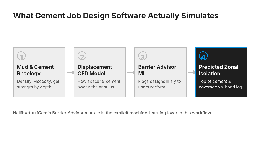
iCem is the most explicitly AI-forward tool in this comparison. Underneath the usual casing hydraulics, ECD, and top-of-cement prediction, its Barrier Advisor module uses a machine learning model trained on historical job data to recommend design decisions and flag ones more likely to fail. It also runs full 3D CFD displacement-efficiency modeling — accounting for casing movement, centralizer spacing, and fluid density differences — to predict how well the spacer and cement actually sweep the annulus instead of fingering past stagnant mud, and it streams up to 20 real-time variables during the job so the design can be checked against what is actually happening downhole as it happens.
- Best for: operators who want a machine-learning recommendation layer, not just a physics simulator, sitting on top of the cement design
- Watch for: the CFD displacement modeling is the most valuable and the most compute-intensive piece — get your mud and cement rheology data clean before you run it
2. SLB CEMENTICS
CEMENTICS covers the entire cement job in one application: fluid design, centralization, mud removal, plug placement, and post-job evaluation. Its WELLCLEAN III engine simulates mud displacement in the pipe and the annulus, and a 3D wellbore model shows cement coverage across the target zones so you can see where contamination risk is highest before the job runs. To its credit, SLB describes this as built on “established and newly developed models” rather than branding it as AI — it is best understood as the deep physics-simulation backbone that a lot of AI-branded cementing workflows elsewhere are quietly built on top of.
- Best for: complex deepwater, highly deviated, or horizontal wells where temperature and hydraulic behavior change a lot across the wellbore
- Watch for: it is a full-workflow platform, so plan for an actual design cycle, not a five-minute spot-check
3. Baker Hughes CemMaster
CemMaster is Baker Hughes’ zonal isolation cementing software, built around fluid-displacement simulation to pick a cement system that minimizes intermixing with the mud it is displacing while still meeting placement goals. Pair it, on the evaluation side, with Baker Hughes’ ChannelView well integrity detection service, which is built to find exactly the kind of post-job channeling that cement design software like CemMaster is trying to prevent in the first place — design tool and verification tool from the same vendor, aimed at the same failure mode.
- Best for: operators already running Baker Hughes cement systems (DeepSet, DuraSet, EnsurSet) who want the design software and the hardware from one vendor
- Watch for: confirm with your rep exactly which displacement variables CemMaster accounts for on your well type before leaning on it for a high-angle or extended-reach design

Check Your Hydrostatic Margin Before You Open Any of Them
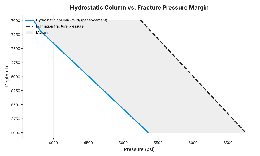
Every one of these platforms will eventually ask you for the same sanity check a reviewing engineer should already have run: does the hydrostatic pressure of the mud, spacer, and cement column ever get close enough to the formation’s fracture gradient to risk losses on the way up? You can screen that yourself with the depth-by-depth fracture gradient you already built in our Eaton’s method fracture gradient tutorial, applied against a simple multi-fluid hydrostatic column.
import pandas as pd

# fluid_segments: list of (density_ppg, top_ft, bottom_ft), shallowest first
# e.g. mud below cement top, spacer, then cement from shoe to top of cement
def hydrostatic_psi(fluid_segments, depth_ft):
    pressure = 0.0
    for density_ppg, top_ft, bottom_ft in fluid_segments:
        if depth_ft <= top_ft:
            continue
        thickness = min(depth_ft, bottom_ft) - top_ft
        if thickness > 0:
            pressure += 0.052 * density_ppg * thickness  # psi
    return pressure

def frac_pressure_psi(depth_ft, frac_gradient_psi_ft):
    return frac_gradient_psi_ft * depth_ft

# worked example: 9,000 ft shoe, cement (16.4 ppg) from 7,200-9,000 ft,
# spacer (10.5 ppg) 7,000-7,200 ft, 10.2 ppg mud above that
segments = [(10.2, 0, 7000), (10.5, 7000, 7200), (16.4, 7200, 9000)]
checkpoints = range(7000, 9001, 200)
frac_gradient = 0.75  # psi/ft, from the Eaton's method worked example

rows = []
for d in checkpoints:
    hydro = hydrostatic_psi(segments, d)
    frac = frac_pressure_psi(d, frac_gradient)
    rows.append({"depth_ft": d, "hydrostatic_psi": round(hydro, 1),
                 "frac_pressure_psi": round(frac, 1),
                 "margin_psi": round(frac - hydro, 1)})

report = pd.DataFrame(rows)
print(report)
print("\nTightest margin:", report["margin_psi"].min(), "psi at",
      report.loc[report["margin_psi"].idxmin(), "depth_ft"], "ft")
Run that across your actual segment plan and look at the tightest margin row. Anything under a couple hundred psi of cushion is exactly the depth where you want the simulator’s full displacement-efficiency model — not just the hydrostatic number — before you commit the design.
Common Pitfalls the Simulators Can’t Fix for You
- Garbage rheology in, garbage displacement prediction out. CFD-based displacement models like iCem’s and CEMENTICS’ WELLCLEAN III are only as good as the mud and cement rheology data you feed them — a plug viscosity number pulled from a spec sheet instead of an actual field sample will quietly wreck the displacement-efficiency prediction.
- Centralization on paper is not centralization downhole. Every one of these tools assumes the centralizer spacing you entered is what actually ends up in the hole. In a doglegged or washed-out section, standoff can be far worse than planned, which is exactly where simulated “good” jobs turn into real channeling — cross-check against your actual survey and any caliper log before you trust the output.
- Gas migration during the transition time is a separate problem from displacement. Even a perfectly displaced annulus can still take on gas while the cement is setting but has not yet gelled enough to resist it. If your zone has any flow potential, make sure whichever tool you use is explicitly modeling the static gel strength development through the transition period, not just placement.
- A clean simulation is not a substitute for a bond log. Treat the software’s predicted top of cement and coverage as the design target, then verify it actually happened — that is the whole reason cement bond log interpretation exists as its own discipline.
How to Pick Between Them
- Want a machine-learning recommendation layer on top of the physics? iCem’s Barrier Advisor is the most explicitly AI-driven of the three.
- Deepwater, high-angle, or horizontal well with a tough temperature profile? CEMENTICS’ WELLCLEAN III and 3D wellbore modeling are built for exactly that.
- Already standardized on one vendor’s cement systems? CemMaster paired with ChannelView keeps design and post-job verification in the same shop.
- Early-stage screening on a tight budget? Run the hydrostatic margin script above first, and bring the result into whichever vendor’s simulator you choose.
Whichever platform wins the quote, verify the result the same way: pull a bond log once the cement sets. See our related comparison of AI tools for cement bond log interpretation for how to check whether the design actually held up downhole, and our AI wellbore stability tools comparison for the geomechanics side of the same well.
