
By Saad Iqbal
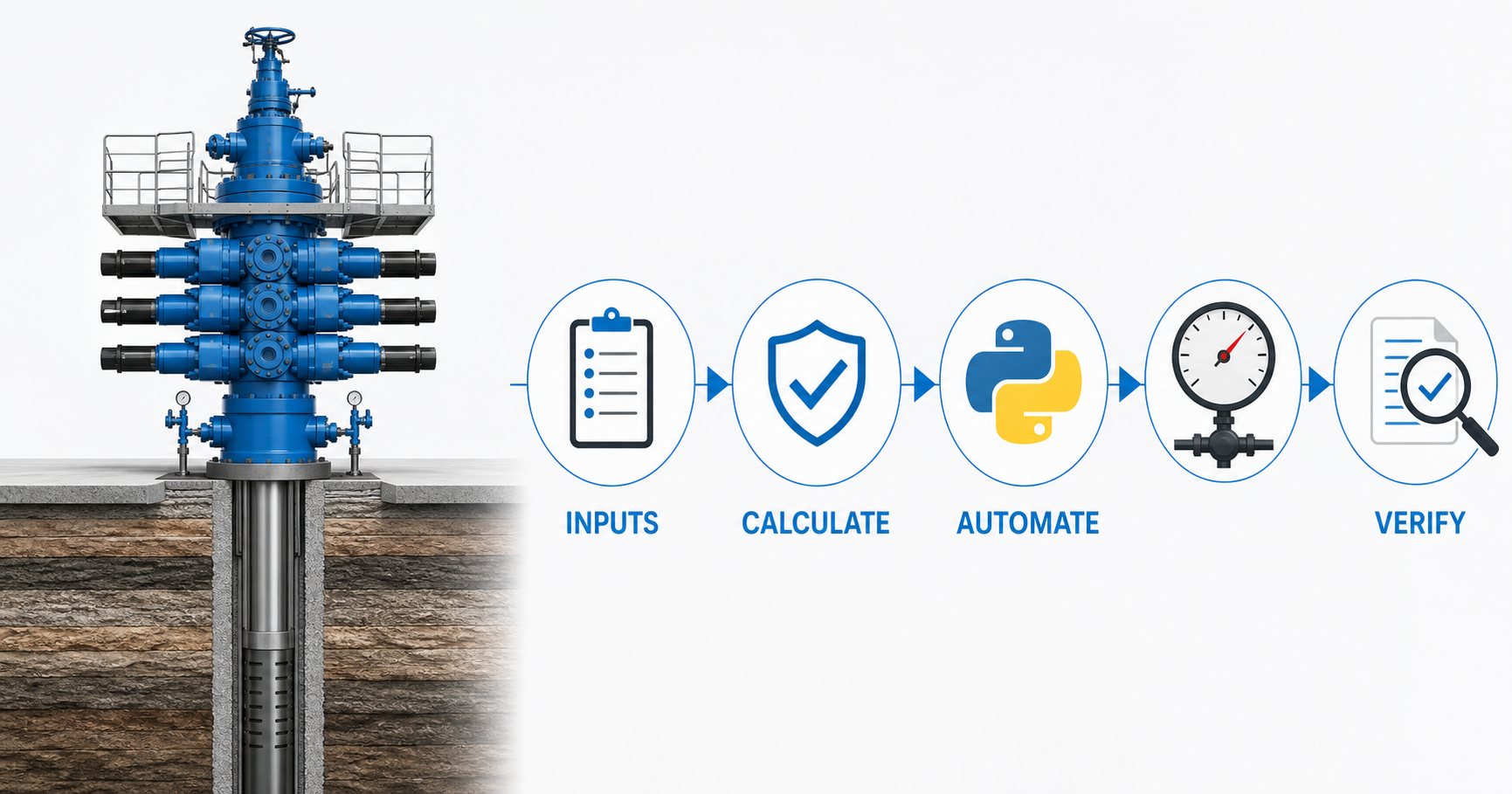
Kill sheet calculation errors can propagate into every pressure target, so this tutorial verifies KMW, ICP and FCP manually before automating the workflow in Python.
It’s 3 a.m. The well just kicked. SIDPP and SICP are climbing on the choke panel, the driller is calling out strokes, and somewhere under a hard hat someone is doing long division on a soggy kill sheet with a pencil that keeps skipping. One transposed digit — a 350 that becomes a 530 — and the kill weight mud you pump is wrong, the schedule is wrong, and the well doesn’t care that you were in a hurry.
The kill sheet calculation hasn’t changed in sixty years: three formulas, done under pressure, on paper, by hand. What has changed is that you can now write those three formulas once, in about twenty lines of Python, and never do the arithmetic live again. This tutorial walks through the kill weight mud (KMW), initial circulating pressure (ICP) and final circulating pressure (FCP) formulas with a full worked example, then automates the whole kill sheet calculation so the only thing you do under pressure is read the answer.
This matters beyond the drama of a single kick. Every rig runs pre-tour kill sheet drills, every well control certification renewal walks through the same three formulas, and every well plan needs a kill sheet worked before spud so the driller isn’t calculating a formula for the first time when it counts. A script that’s been checked once against a known-good kill sheet turns a formula you half-remember into a tool you trust — for drills, for planning, and for the real thing.
Prerequisites
- Python 3.10 or later installed — get it from python.org if you don’t have it already.
- A text editor or a Jupyter notebook to run the script in.
- Recorded shut-in data from a proper flow check: original mud weight (OMW), shut-in drillpipe pressure (SIDPP), shut-in casing pressure (SICP), true vertical depth (TVD) and the slow circulating rate pressure (SCR) at kill pump speed.
- Sample values used throughout this tutorial: OMW = 10.2 ppg, SIDPP = 350 psi, SICP = 410 psi, TVD = 11,400 ft, SCR = 480 psi.
Step 1: Capture the Shut-In Data Correctly
Every kill sheet calculation is only as good as the numbers you feed it. Once the BOP is closed on a confirmed kick, let pressures stabilize before you read SIDPP and SICP — a gauge that’s still trending is a number you’ll have to explain later. TVD, not measured depth, goes into every formula below; on a deviated or horizontal well those two numbers can differ by thousands of feet.
This tutorial scripts the driller’s method, which circulates out the influx first at original mud weight and brings kill weight mud in on a second circulation. The wait-and-weight method — one circulation, kill weight mud from the start — uses the same KMW formula and a similar ICP/FCP pressure schedule, just with the pressure drop starting immediately rather than after the first circulation; the Python function below is easy to adapt to either by changing how the schedule stages are generated.

Why it matters: the kill weight mud formula is a straight linear function of SIDPP and TVD. A stale or misread pressure doesn’t just introduce a small error — it moves your target mud weight by a margin that can mean an underbalanced well control kill or unnecessary formation damage from too much overbalance.
Step 2: Calculate Kill Mud Weight (KMW)
The kill mud weight formula converts the shut-in drillpipe pressure into the extra mud weight needed to balance the influx, using the standard 0.052 psi/ft/ppg gradient constant:
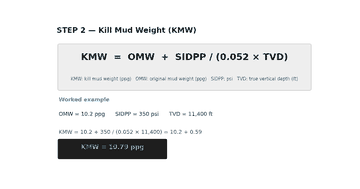
Where KMW and OMW are in pounds per gallon (ppg), SIDPP is in psi, and TVD is in feet. Plugging in the sample values: KMW = 10.2 + 350 / (0.052 × 11,400) = 10.2 + 0.59 = 10.79 ppg. That 0.59 ppg “kill margin” is the whole point of the exercise — it’s the extra mud weight needed to balance the influx once it’s circulated out.
Step 3: Calculate Initial and Final Circulating Pressure (ICP, FCP)
With KMW in hand, the driller’s method and wait-and-weight method both need two more numbers: the pressure to hold on the drillpipe gauge the instant you start pumping (ICP), and the pressure once kill weight mud has displaced the original mud all the way to the bit (FCP):

SCR is the slow circulating rate pressure you recorded before the kick, at the same pump speed you’ll use to kill the well — it’s a field-measured number, not a calculated one. With SCR = 480 psi: ICP = 350 + 480 = 830 psi, and FCP = 480 × (10.79/10.2) = 507.6 psi. Between those two points the drillpipe pressure schedule is a straight line against strokes pumped, which is exactly what the driller follows on the pump-pressure gauge during the kill.
Step 4: Automate It With Python
Three formulas are easy to memorize and easy to mistype under pressure. Script them once and you remove the arithmetic from the emergency entirely — the well control decision-making stays with the driller and the company man, but the math stops being a variable.
import argparse
import csv

def kill_sheet(omw, sidpp, sicp, tvd, scr, maasp=None, stages=5):
    """Return KMW, ICP, FCP and a straight-line pressure schedule."""
    kmw = omw + sidpp / (0.052 * tvd)
    icp = sidpp + scr
    fcp = scr * (kmw / omw)

    schedule = []
    for i in range(stages + 1):
        frac = i / stages
        strokes = round(1000 * frac)  # replace 1000 with your surface-to-bit strokes
        pressure = icp - (icp - fcp) * frac
        schedule.append((strokes, round(pressure, 1)))

    ok = maasp is None or sicp < maasp
    return kmw, icp, fcp, schedule, ok

if __name__ == "__main__":
    p = argparse.ArgumentParser(description="Kill sheet calculator")
    p.add_argument("--omw", type=float, required=True, help="Original mud weight, ppg")
    p.add_argument("--sidpp", type=float, required=True, help="Shut-in drillpipe pressure, psi")
    p.add_argument("--sicp", type=float, required=True, help="Shut-in casing pressure, psi")
    p.add_argument("--tvd", type=float, required=True, help="True vertical depth, ft")
    p.add_argument("--scr", type=float, required=True, help="Slow circulating rate pressure, psi")
    p.add_argument("--maasp", type=float, default=None, help="Max allowable annular surface pressure, psi")
    args = p.parse_args()

    kmw, icp, fcp, schedule, ok = kill_sheet(
        args.omw, args.sidpp, args.sicp, args.tvd, args.scr, args.maasp
    )

    print(f"Kill Mud Weight (KMW) ......... {kmw:.2f} ppg")
    print(f"Initial Circulating Pressure .. {icp:.1f} psi")
    print(f"Final Circulating Pressure .... {fcp:.1f} psi")
    if args.maasp:
        print(f"Max allowable annular pressure  {args.maasp} psi   [{'OK' if ok else 'EXCEEDED'}: SICP {'<' if ok else '>='} MAASP]")

    with open("kill_schedule.csv", "w", newline="") as f:
        writer = csv.writer(f)
        writer.writerow(["strokes", "drillpipe_pressure_psi"])
        writer.writerows(schedule)
    print(f"Pressure schedule ({len(schedule)} stages) written to kill_schedule.csv")

Run it from the command line with your shut-in numbers as arguments and it prints KMW, ICP and FCP, checks SICP against your MAASP if you supply one, and writes a full stroke-by-stroke pressure schedule to a CSV you can hand straight to the driller. Replace the placeholder 1000 strokes in the schedule loop with your actual surface-to-bit stroke count (pump displacement divided by the drillstring and open-hole volume between surface and the bit) and the CSV becomes the exact drillpipe-pressure-vs-strokes chart the driller reads off during the kill.
If a number gets corrected — the mud logger revises TVD, or SICP creeps up another 10 psi as it stabilizes — you rerun the script in seconds instead of re-doing the algebra by hand. On rigs already running a workflow tool like Power Automate or n8n, this same function can sit behind a simple form so the mud logger or company man triggers it without opening a terminal, with the CSV emailed straight to the rig floor. For a quick sanity narrative around the numbers, or to help draft the incident report afterward, tools like ChatGPT or Claude are useful once the hard numbers are already locked in by the script — never before.
Step 5: Verify Against a Known Kill Sheet
Before you trust any script on a live well, check it against a kill sheet you or a colleague has worked by hand. Feed in the same OMW, SIDPP, SICP, TVD and SCR, and the script’s KMW, ICP and FCP should match the manual answer to within rounding — a few hundredths of a ppg or a fraction of a psi.

Expected result: for the sample data in this tutorial, KMW = 10.79 ppg, ICP = 830 psi and FCP = 507.6 psi, matching the manual worksheet exactly. As a second sanity check, confirm that FCP is lower than ICP (it should be, since the annulus fills with heavier mud as circulation proceeds) and that your SICP sits comfortably below MAASP before you ever open the choke.
Common Pitfalls
- Using measured depth instead of TVD. The 0.052 gradient constant only works with true vertical depth — on a deviated or horizontal well, MD can overstate TVD by a wide margin and silently understate KMW.
- Reading SIDPP or SICP before shut-in has stabilized. A gauge that’s still climbing gives you a kill weight mud that’s already out of date by the time you start pumping.
- Forgetting to recompute FCP if pump speed changes mid-job. SCR is specific to a pump rate; if the kill pump speed changes, you need a new SCR reading and a new FCP, not the old one scaled by guesswork.
None of this replaces your company’s well control procedures or a driller’s method / wait-and-weight training course — the script is a calculator, not a decision-maker. But once the arithmetic is automated, the well control team spends its attention where it belongs: watching the well, not checking long division. For the pressure math on the drilling side of the same well, see our tutorial on automating ECD calculations in Python, and for the early-warning side of well control, read how machine learning beats the clock on kick detection.
